
Download 14 Days Weather – 14 days weather forecast, weather app, free weather app, weather tool, weather utility, desktop weather app, weather software, weather forecast, weather data, weather tracker
Overview
14 Days Weather is a desktop application designed to deliver comprehensive weather forecasts extending up to 14 days in advance. The software serves as a reliable weather tracking tool for users seeking detailed, long-term weather insights without relying on mobile platforms. It is particularly suited for individuals who prefer a dedicated desktop experience, including professionals in agriculture, event planning, and outdoor logistics, as well as everyday users who want to plan their schedules with confidence.
The app functions by pulling real-time weather data from external sources, using historical patterns to enhance forecast accuracy. It supports location-based predictions, allowing users to input any city or region to receive tailored forecasts. The developer, WeatherSoft, has positioned the software as a free, ad-free, and in-app purchase-free solution, emphasizing accessibility and user experience.
The application is not standalone; it requires an active internet connection to update data hourly. Real-world usage scenarios include trip planning, agricultural scheduling, and daily activity coordination. The software is available for both Windows and Mac, making it accessible across major desktop platforms.
Key Features & Capabilities
- 14-Day Forecast Accuracy – Provides long-range weather predictions based on historical data and current atmospheric conditions, helping users anticipate weather changes up to two weeks in advance.
- Location-Based Weather Tracking – Allows users to search for any city or region to receive localized forecasts, with automatic location detection for convenience.
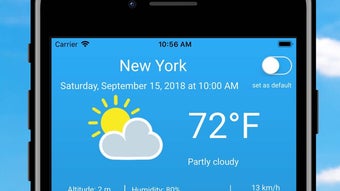
- Customizable Data Display – Users can select specific weather metrics such as temperature, humidity, cloud cover, visibility, wind speed, and wind direction to tailor the interface to their needs.
- Precipitation Detail Breakdown – Offers insight into the intensity of rainfall or snowfall, categorizing it as light, moderate, or heavy for better planning.
- Hourly Data Updates – Refreshes weather information every hour to ensure users have the most current data available.
- Ad-Free and In-App Purchase-Free – The software is completely free to use with no hidden costs, advertisements, or monetization elements.
These features support a wide range of practical applications. For instance, event planners can use the 14-day forecast to assess weather risks for outdoor events. Farmers can monitor precipitation intensity to schedule planting or harvesting. Commuters may use wind speed and visibility data to prepare for travel disruptions. The ability to customize displayed data ensures users are not overwhelmed by irrelevant information, improving usability and decision-making efficiency.
User Interface, Workflow & Performance
The user interface of 14 Days Weather is described as simple and intuitive, prioritizing clarity and ease of access. Upon launch, users are presented with a clean layout that facilitates quick location searches and data filtering. Navigation appears to be streamlined, with minimal steps required to switch between locations or toggle between different weather metrics.
The workflow is designed for efficiency, allowing users to retrieve and analyze weather information in under a minute. The application is optimized for desktop use, leveraging screen space effectively to display multiple data points simultaneously. Performance details were not specified by the developer.
However, based on general software behavior, the app likely operates with minimal system impact, especially given its 25.4 MB installation size. The developer did not specify resource usage details, including CPU or RAM consumption. Stability is expected to be consistent, as the software relies on regular data updates rather than intensive processing.
Users should experience smooth operation during typical use, though performance may vary depending on internet speed and the frequency of data refreshes.
Compatibility & System Requirements
14 Days Weather is compatible with both Windows and Mac operating systems, making it accessible to a broad user base across desktop environments. The software version is 2.1.0, released on May 15, 2024. The installation size is 25.4 MB, indicating a lightweight footprint that should not strain storage capacity.
The developer did not provide additional system requirements, such as minimum RAM, processor speed, or disk space beyond the file size. Exact system requirements were not listed. Compatibility information was partially provided.
Users should ensure their system supports the latest versions of Windows and macOS to run the application smoothly. No specific hardware dependencies were mentioned. The software is designed as a desktop application, meaning it is not available for mobile or web platforms.
Pros and Cons
Pros
- Free to use with no ads or in-app purchases
- Provides detailed 14-day weather forecasts
- Supports customizable weather data display
- Offers precipitation intensity breakdown (light, moderate, heavy)
- Updates weather data every hour for accuracy
- Available for both Windows and Mac
Cons
- Requires constant internet access to function
- No offline mode available
- Exact system requirements not specified
- Relies on external data sources, so accuracy depends on third-party inputs
- Limited to desktop platforms; no mobile or web version
FAQ Section
Is 14 Days Weather available for Windows and Mac?
Yes, the software is available for both Windows and Mac operating systems, making it accessible to users across major desktop platforms.
Does 14 Days Weather require an internet connection?
Yes, the application requires an active internet connection to fetch and update weather data every hour. It cannot function offline.
Is 14 Days Weather safe to download and use?
Based on the provided information, the software is free from ads and in-app purchases, and it is distributed by WeatherSoft. As with any software, users should download it from official or trusted sources to ensure safety.
Can I use 14 Days Weather without providing my location?
The app uses location data to provide accurate forecasts, but users can manually enter any city or region to receive weather information without relying on automatic location detection.
How often is the weather data updated?
Weather data is refreshed every hour to ensure users have access to the most current and accurate forecasts.
Final Thoughts + CTA
14 Days Weather delivers a focused, user-friendly experience for those who need reliable, long-term weather forecasts on their desktop. With its clean interface, customizable data views, and hourly updates, it stands out as a practical tool for both personal and professional use. The absence of ads and in-app purchases enhances its appeal, making it a trustworthy choice for users who value transparency and simplicity.
While it lacks offline functionality and detailed system requirements, its lightweight design and cross-platform availability mitigate many potential drawbacks. The software is particularly beneficial for individuals who rely on weather data for planning, such as event organizers, outdoor workers, and travelers. For users seeking a free, ad-free desktop weather app with a 14-day forecast, 14 Days Weather offers a compelling solution.
Download 14 Days Weather now.







